Nx: The Full-Featured Monorepo Build System for TypeScript
Nx is a build system for monorepos that goes significantly further than task runners. Beyond caching and parallelization, it offers code generators, static analysis of your project graph, enforced module boundaries, and tools for understanding the impact of changes.
It's heavier than Turborepo but brings capabilities that matter for larger projects and teams.
Nx vs. Turborepo
This is the first question most developers have. The honest answer:
| Nx | Turborepo | |
|---|---|---|
| Setup complexity | Higher | Lower |
| Configuration | More code | Simple JSON |
| Code generators | Built-in | None |
| Project graph | Static analysis | Inferred from npm deps |
| Affected detection | More accurate | Git-based |
| Module boundaries | Enforced via lint | None |
| Remote cache | Nx Cloud (paid) or self-hosted | Vercel (free) or self-hosted |
| Plugin ecosystem | Extensive | Minimal |
| Learning curve | Significant | Low |
Use Nx when:
- You want code generators for consistent scaffolding
- You need enforced architecture boundaries (prevents UI from importing server code, etc.)
- You have a complex dependency graph and need accurate affected detection
- You're building a large team project and want comprehensive tooling
Use Turborepo when:
- You want simple, fast setup
- Your monorepo is straightforward and doesn't need generators
- You're fine with the dependency graph being inferred from
package.json - You want free remote caching
Both do task caching well. The difference is everything around it.
Getting Started
# Create new Nx workspace
npx create-nx-workspace@latest my-org

# Add Nx to existing monorepo
npx nx@latest init
Nx will analyze your existing package.json scripts and create initial configuration.
Workspace Structure
my-org/
├── apps/
│   ├── web/           # Applications
│   └── api/
├── libs/
│   ├── ui/            # Shared libraries
│   ├── utils/
│   └── feature-auth/
├── tools/
│   └── generators/    # Custom code generators
├── nx.json            # Nx configuration
└── package.json
Nx distinguishes between apps (deployable) and libs (shared code). This isn't enforced at the filesystem level, but Nx's tooling builds around this distinction.
nx.json Configuration
{
  "$schema": "./node_modules/nx/schemas/nx-schema.json",
  "targetDefaults": {
    "build": {
      "dependsOn": ["^build"],
      "outputs": ["{projectRoot}/dist"],
      "cache": true
    },
    "test": {
      "cache": true,
      "outputs": ["{projectRoot}/coverage"]
    },
    "lint": {
      "cache": true
    }
  },
  "namedInputs": {
    "production": [
      "default",
      "!{projectRoot}/**/*.spec.ts",
      "!{projectRoot}/jest.config.*"
    ]
  },
  "defaultProject": "web"
}
The {projectRoot} token is project-specific (expands to apps/web, libs/ui, etc.). This is how Nx tracks which outputs belong to which project.
Running Tasks
# Run a task for all projects
nx run-many --target=build

# Run for specific projects
nx build web
nx test @myorg/ui

# Run affected projects only (changed since main)
nx affected --target=test
nx affected --target=build --base=main --head=HEAD

# Show the project graph visually
nx graph
The nx affected command
nx affected determines which projects are affected by changes since your base branch. It uses static analysis (importing relationships) in addition to git changes, which is more accurate than pure git-based detection:
# In CI (PR targeting main)
nx affected --target=build,test,lint --base=origin/main --head=HEAD
If web imports from ui and you change ui, both web and ui are affected. If you change api which web doesn't import, only api is tested.
Plugins and Code Generators
Nx plugins provide first-class integration with specific frameworks. Official plugins:
# Install plugins
npm add -D @nx/next      # Next.js
npm add -D @nx/react     # React
npm add -D @nx/express   # Express
npm add -D @nx/node      # Node.js
npm add -D @nx/jest      # Jest
npm add -D @nx/vite      # Vite
npm add -D @nx/playwright # Playwright
Plugins provide generators (scaffolding) and executors (build/test/serve tasks):
# Generate a new Next.js app
nx generate @nx/next:app my-new-app

# Generate a new shared library
nx generate @nx/react:lib feature-user-profile --directory=libs/features

# Generate a component in an existing library
nx generate @nx/react:component Button --project=ui --export
Generated code follows your configured conventions — no copy-pasting from existing projects.
Module Boundary Enforcement
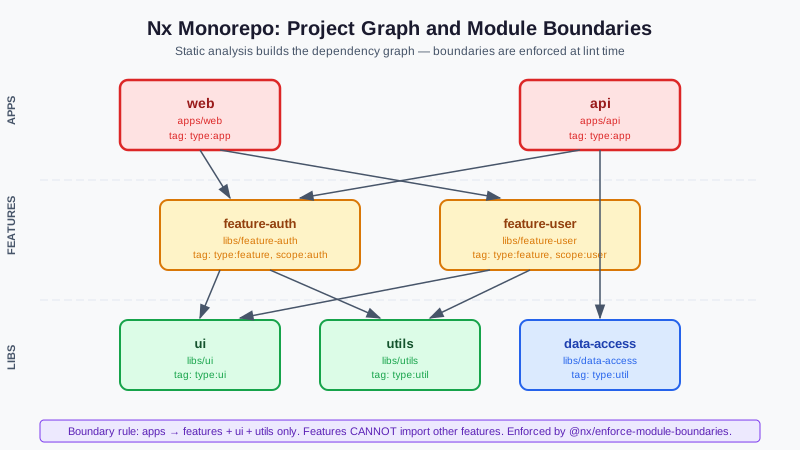
One of Nx's most powerful features: enforcing that certain libraries can only be used by certain other libraries.
Define tags in project.json:
// libs/feature-auth/project.json
{
  "name": "feature-auth",
  "tags": ["scope:auth", "type:feature"]
}
// apps/web/project.json
{
  "name": "web",
  "tags": ["scope:web", "type:app"]
}
Then enforce boundaries via ESLint:
// .eslintrc.json
{
  "rules": {
    "@nx/enforce-module-boundaries": [
      "error",
      {
        "allow": [],
        "depConstraints": [
          {
            "sourceTag": "type:app",
            "onlyDependOnLibsWithTags": ["type:feature", "type:ui", "type:util"]
          },
          {
            "sourceTag": "type:feature",
            "onlyDependOnLibsWithTags": ["type:ui", "type:util"]
          },
          {
            "sourceTag": "scope:auth",
            "onlyDependOnLibsWithTags": ["scope:auth", "scope:shared"]
          }
        ]
      }
    ]
  }
}
This enforces your architecture: apps can import features, UI components, and utils — but features can't import other features, and auth code can't import billing code.
Violations are caught at lint time, not runtime.
Project Graph
nx graph
Opens an interactive visualization of your dependency graph. You can:
- See all projects and their relationships
- Filter to focus on specific projects
- Check what's affected by a proposed change
- Export the graph as JSON for custom tooling
This is invaluable for understanding a large monorepo you've inherited.
Custom Generators
Write your own generators for project-specific scaffolding:
nx generate @nx/plugin:generator my-generator --project=tools
// tools/generators/my-generator/generator.ts
import { Tree, formatFiles, generateFiles } from '@nx/devkit';

export async function myGenerator(tree: Tree, options: MyGeneratorSchema) {
  generateFiles(tree, path.join(__dirname, 'files'), options.directory, {
    name: options.name,
    template: '',  // Required for .template file extension stripping
  });

  await formatFiles(tree);
}
Create template files in tools/generators/my-generator/files/ with __name__.ts.template naming conventions.
Remote Caching
Nx Cloud (managed)
nx connect-to-nx-cloud
Free for individuals and small teams. Paid for larger usage. The tightest integration — results appear in the Nx Cloud dashboard.
Self-hosted remote cache
The open-source nx-remote-cache package or a compatible S3/GCS cache:
// nx.json
{
  "tasksRunnerOptions": {
    "default": {
      "runner": "nx/tasks-runners/default",
      "options": {
        "cacheableOperations": ["build", "test", "lint"],
        "remoteCache": {
          "url": "https://my-cache-server.com"
        }
      }
    }
  }
}
Migrating Between Nx Versions
Nx provides automated migration:
nx migrate latest  # Updates nx.json, project.json, and scripts
nx migrate --run-migrations  # Apply migrations
This is significantly better than manually updating Nx — migrations handle breaking changes automatically.
When Nx Is Overkill
Not every monorepo needs Nx. Skip it if:
- You have fewer than 5 packages and they're simple
- You don't need code generators — your team is small enough to copy-paste
- You don't have architecture boundary problems
- You want minimal tooling overhead
Turborepo or even plain npm/pnpm workspaces may be enough. Nx shines as the monorepo grows in complexity and team size.
More TypeScript tooling guides at DevTools Guide newsletter.