Changesets: Automated Versioning and Changelogs for TypeScript Packages
Versioning npm packages manually is error-prone. Which packages need new versions? What changed? Did you update the changelog? Did you forget to bump a dependency version when you released an upstream change?
Photo by Job Ferrari on Unsplash
Changesets automates this. Developers write short markdown "changesets" describing what changed and why. When it's time to release, Changesets consumes those files to bump the right package versions, update changelogs, and publish to npm — all automated in CI.
It's the standard approach for TypeScript monorepos used by projects like Remix, Svelte, Panda CSS, and many others.
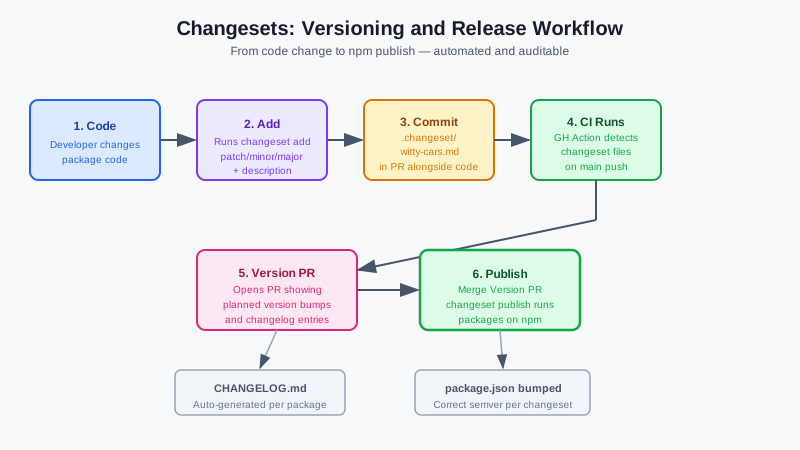
How Changesets Works
- Developer makes a change to a package
- Developer runs
changeset addto write a short description of the change and its semver impact (patch, minor, or major) - The changeset file is committed alongside the code change
- When ready to release, a CI job consumes all pending changesets, bumps versions, and updates
CHANGELOG.mdfiles - Packages are published to npm (or wherever)
The key insight: the decision about whether a change is a patch/minor/major is made by the developer who wrote the change — not a separate reviewer, and not based on an automated tool trying to infer impact from code diffs.
Installation
# npm
npm install @changesets/cli --save-dev

# Bun
bun add -d @changesets/cli

# pnpm
pnpm add -D @changesets/cli
Initialize:
bunx changeset init
# Creates .changeset/ directory with config.json
Workflow: Adding a Changeset
After making changes to a package:
bunx changeset
# Or: npx changeset
This launches an interactive CLI:
- Select which packages were changed
- For each changed package, choose the semver impact (patch/minor/major)
- Write a short description of the change
A file is created in .changeset/ (e.g., .changeset/witty-cars-drink.md):
---
"@myrepo/ui": minor
"@myrepo/utils": patch
---

Added a new `Button` variant `destructive`. Updated `formatDate` to handle timezone offsets.
This file is committed with the PR. The description becomes part of the CHANGELOG.md.
Want more developer tools guides? Get guides like this in your inbox — DevTools Guide delivers one free deep-dive every week.
Configuration
.changeset/config.json:
{
  "$schema": "https://unpkg.com/@changesets/[email protected]/schema.json",
  "changelog": "@changesets/cli/changelog",
  "commit": false,
  "fixed": [],
  "linked": [],
  "access": "public",
  "baseBranch": "main",
  "updateInternalDependencies": "patch",
  "ignore": []
}
Key options:
access:"public"for public npm packages,"restricted"for privateupdateInternalDependencies: When package A depends on package B and B gets a new version, how should A's dependency on B be updated?"patch"is usually appropriate.baseBranch: The branch changesets compares against forstatuscommandignore: Packages to never version/publish (useful for internal apps)
Linked packages
If several packages should always have the same version (e.g., a main package and its types package):
{
  "linked": [["my-package", "@types/my-package"]]
}
Fixed packages
If packages should always release together (monorepo where all packages share a version):
{
  "fixed": [["@myrepo/ui", "@myrepo/utils", "@myrepo/config"]]
}
CI/CD with GitHub Actions
The standard Changesets GitHub Actions pattern uses two jobs:
- Changeset PR job: Opens/updates a PR that shows what will happen on next release
- Release job: When the changeset PR is merged, versions and publishes packages
# .github/workflows/release.yml
name: Release

on:
  push:
    branches:
      - main

concurrency: ${{ github.workflow }}-${{ github.ref }}

jobs:
  release:
    name: Release
    runs-on: ubuntu-latest
    steps:
      - name: Checkout
        uses: actions/checkout@v4

      - name: Setup Bun
        uses: oven-sh/setup-bun@v2

      - name: Install dependencies
        run: bun install --frozen-lockfile

      - name: Build packages
        run: bun run build

      - name: Create Release PR or Publish
        id: changesets
        uses: changesets/action@v1
        with:
          publish: bun run release
          version: bun run version
          commit: "chore: version packages"
          title: "chore: version packages"
        env:
          GITHUB_TOKEN: ${{ secrets.GITHUB_TOKEN }}
          NPM_TOKEN: ${{ secrets.NPM_TOKEN }}
Add these scripts to your root package.json:
{
  "scripts": {
    "release": "turbo run build && changeset publish",
    "version": "changeset version && bun install --frozen-lockfile"
  }
}
How the CI flow works
- Developer merges a PR with changeset files
- The GitHub Action runs and detects pending changesets
- Action opens (or updates) a "Version Packages" PR showing the planned version bumps
- When the "Version Packages" PR is merged:
changeset versionbumps package.json versions and updates CHANGELOGschangeset publishpublishes changed packages to npm
- The changeset files in
.changeset/are deleted automatically
The Version Packages PR
The changeset action keeps a PR open called "Version Packages" (or your custom title). It shows:
- Which packages will be bumped
- What version they'll become
- The generated changelog entries
When your team is ready to release, they merge this PR. The publish step runs automatically.
Some teams prefer to keep this PR draft and manually trigger releases. Others release automatically whenever it's merged.
Manual Release (Without CI)
# See what would happen
bunx changeset status

# Bump versions and update changelogs (no publish)
bunx changeset version

# Review the version bumps, then publish
bunx changeset publish
This is useful for initial setup testing and emergency releases.
Prerelease Versions
For alpha/beta releases:
# Enter prerelease mode
bunx changeset pre enter alpha
# All changesets added in this mode will create alpha versions

# Create and apply changesets as normal

# Exit prerelease mode
bunx changeset pre exit
Packages will version as 1.2.0-alpha.1, 1.2.0-alpha.2, etc.
Snapshot Releases
For publishing test versions without advancing the real version:
bunx changeset version --snapshot
bunx changeset publish --tag snapshot
This creates versions like 1.2.0-20240228100000 that can be installed from npm with npm install my-package@snapshot.
Working With Changesets: Team Tips
Include changeset files in PRs: Make it a code review requirement. A PR that changes a public API without a changeset is incomplete.
One changeset per logical change: Don't squash unrelated changes into one changeset. Each distinct user-facing change should have its own changeset.
Descriptions are user-facing: The changeset description ends up in CHANGELOG.md. Write it for users, not for reviewers.
Use the @changesets/bot GitHub App: It comments on PRs to remind developers to add a changeset when they've changed package code.
Alternatives
| Tool | Approach |
|---|---|
| semantic-release | Infers version from commit messages (conventional commits) |
| standard-version | Conventional commits based, simpler than semantic-release |
| Release Please | Google's solution, also commit-message based |
| Manual | You decide everything manually |
Changesets is unique in that version decisions are explicit and code-review-friendly, not inferred from commit messages. This makes it better for monorepos with complex dependency graphs, and for teams where not everyone follows conventional commit conventions perfectly.