
gRPC and Protocol Buffers: A Developer's Guide
gRPC and Protocol Buffers: A Developer's Guide
gRPC is Google's open-source RPC framework, and Protocol Buffers (protobuf) are its IDL and serialization format. If REST is the lingua franca of web APIs, gRPC is the dialect used when teams care about type safety, performance, and code generation across service boundaries.
This guide covers when gRPC is and isn't the right tool, how protobuf serialization works, writing and compiling .proto files, and the practical tooling you'll use day-to-day.
Why gRPC Exists
REST over JSON works fine until it doesn't. The problems that drive teams to gRPC:
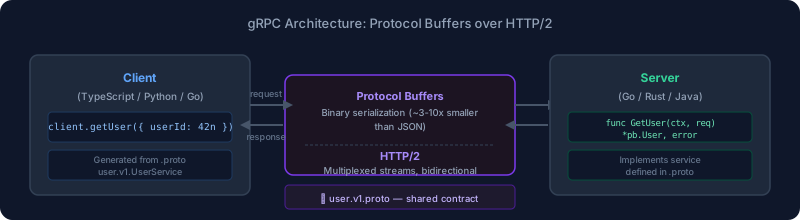
Serialization overhead: JSON is human-readable but verbose. Protobuf encodes the same data in binary — typically 3-10x smaller — which matters when you're passing millions of messages between services.
No shared contract: REST APIs are documented (hopefully) but not enforced. gRPC's .proto files are the contract, and code is generated from them. If the server changes its API, clients get compile errors, not runtime surprises.
Streaming: REST handles request-response. gRPC supports unary (request-response), server streaming, client streaming, and bidirectional streaming, all over a single HTTP/2 connection.
Language interoperability: Protobuf code generation supports 10+ languages with official plugins. A Python service and a Go service can share .proto definitions and call each other with type-safe generated code.
When to Use gRPC vs REST
Use gRPC for:
- Internal service-to-service communication, especially in polyglot environments
- High-volume, low-latency internal APIs where binary serialization matters
- Streaming scenarios: live updates, bidirectional chat, large file transfers
- APIs where a strict contract is valuable and the clients are under your control
Use REST for:
- Public APIs consumed by unknown clients
- Browser-native clients (gRPC-web is available but adds complexity)
- Simple CRUD APIs where the JSON overhead is negligible
- Teams unfamiliar with protobuf tooling who need to move fast
Protocol Buffers: The Basics
Protocol Buffers are Google's data serialization format — the "payload" format that gRPC uses. You write a .proto file describing your data structures, run a compiler (protoc) to generate language-specific code, and use that generated code to serialize and deserialize messages.
Writing a .proto File
syntax = "proto3";

package user.v1;

option go_package = "github.com/yourorg/api/user/v1;userv1";

// A service definition
service UserService {
  // Unary RPC
  rpc GetUser(GetUserRequest) returns (User);

  // Server streaming: returns a stream of events
  rpc WatchUserActivity(WatchRequest) returns (stream ActivityEvent);

  // Client streaming: client sends a stream, gets one response
  rpc BatchCreateUsers(stream CreateUserRequest) returns (BatchCreateResponse);

  // Bidirectional streaming
  rpc Chat(stream ChatMessage) returns (stream ChatMessage);
}

message User {
  int64 id = 1;
  string email = 2;
  string display_name = 3;
  bool is_active = 4;
  int64 created_at = 5;  // Unix timestamp
}

message GetUserRequest {
  int64 user_id = 1;
}

message WatchRequest {
  int64 user_id = 1;
}

message ActivityEvent {
  string event_type = 1;
  string payload = 2;
  int64 timestamp = 3;
}
Field numbers (the = 1, = 2 after each field) are what get encoded on the wire, not the field names. This is how protobuf achieves its compactness — and it's also why you should never reuse field numbers for deleted fields. Mark old fields as reserved instead:
message User {
  reserved 6, 7;  // Old fields: password_hash, salt
  reserved "password_hash", "salt";  // Belt and suspenders

  int64 id = 1;
  string email = 2;
  // ...
}
Field Types and Defaults
Protobuf3 gives every field a default value: 0 for numbers, empty string for strings, false for booleans, empty for repeated fields. This means you can't distinguish between "field was set to zero" and "field wasn't set at all" without wrappers. For optional semantics, use the optional keyword (reintroduced in proto3) or google.protobuf.Int64Value wrapper types.
message UpdateUserRequest {
  int64 user_id = 1;
  optional string display_name = 2;  // null means "don't update this field"
  optional bool is_active = 3;
}
Want more apis guides? Get guides like this in your inbox — DevTools Guide delivers one free deep-dive every week.
Code Generation
You compile .proto files with protoc, the Protocol Buffer compiler:
# Install protoc (macOS)
brew install protobuf

# Install Go plugin
go install google.golang.org/protobuf/cmd/protoc-gen-go@latest
go install google.golang.org/grpc/cmd/protoc-gen-go-grpc@latest

# Generate Go code
protoc \
  --go_out=./gen \
  --go_opt=paths=source_relative \
  --go-grpc_out=./gen \
  --go-grpc_opt=paths=source_relative \
  proto/user/v1/user.proto
For TypeScript, the ecosystem has fragmented. The most common choices:
# Install protoc-gen-ts
npm install -D @protobuf-ts/plugin ts-proto

# Generate TypeScript with protobuf-ts
protoc \
  --ts_out=./gen \
  --ts_opt=server_grpc1 \
  proto/user/v1/user.proto

# Or with ts-proto (different generated style)
protoc \
  --plugin=./node_modules/.bin/protoc-gen-ts_proto \
  --ts_proto_out=./gen \
  proto/user/v1/user.proto
buf: The Modern protoc Replacement
Managing protoc plugins and path configuration manually gets unwieldy. buf is the modern replacement:
# buf.yaml
version: v2
modules:
  - path: proto
deps:
  - buf.build/googleapis/googleapis

# buf.gen.yaml
version: v2
plugins:
  - remote: buf.build/protocolbuffers/go
    out: gen/go
    opt: paths=source_relative
  - remote: buf.build/grpc/go
    out: gen/go
    opt: paths=source_relative
# Install
brew install bufbuild/buf/buf

# Generate code
buf generate

# Check for breaking changes
buf breaking --against .git#branch=main

# Lint .proto files
buf lint
buf also hosts the Buf Schema Registry (BSR) for sharing proto definitions across teams and consuming well-known types (Google APIs, OpenTelemetry, etc.).
Implementing a gRPC Server in Go
package main

import (
    "context"
    "net"

    "google.golang.org/grpc"
    "google.golang.org/grpc/codes"
    "google.golang.org/grpc/status"

    pb "github.com/yourorg/api/gen/go/user/v1"
)

type userServer struct {
    pb.UnimplementedUserServiceServer
    // your dependencies here
}

func (s *userServer) GetUser(ctx context.Context, req *pb.GetUserRequest) (*pb.User, error) {
    if req.UserId == 0 {
        return nil, status.Error(codes.InvalidArgument, "user_id is required")
    }

    // Fetch from your database
    user, err := s.db.GetUser(ctx, req.UserId)
    if err != nil {
        return nil, status.Errorf(codes.NotFound, "user %d not found", req.UserId)
    }

    return &pb.User{
        Id:    user.ID,
        Email: user.Email,
    }, nil
}

func main() {
    lis, _ := net.Listen("tcp", ":50051")
    s := grpc.NewServer()
    pb.RegisterUserServiceServer(s, &userServer{})
    s.Serve(lis)
}
Implementing a gRPC Client in TypeScript
With @grpc/grpc-js and generated TypeScript:
import * as grpc from '@grpc/grpc-js';
import { UserServiceClient } from './gen/user/v1/user_grpc_pb';
import { GetUserRequest } from './gen/user/v1/user_pb';

const client = new UserServiceClient(
  'localhost:50051',
  grpc.credentials.createInsecure()  // Use createSsl() in production
);

async function getUser(userId: number) {
  const request = new GetUserRequest();
  request.setUserId(userId);

  return new Promise((resolve, reject) => {
    client.getUser(request, (error, response) => {
      if (error) reject(error);
      else resolve(response.toObject());
    });
  });
}
With connect-rpc (the modern alternative using native fetch):
import { createClient } from "@connectrpc/connect";
import { createGrpcTransport } from "@connectrpc/connect-node";
import { UserService } from "./gen/user/v1/user_connect";

const transport = createGrpcTransport({
  baseUrl: "http://localhost:50051",
  httpVersion: "2",
});

const client = createClient(UserService, transport);

const user = await client.getUser({ userId: 42n });
console.log(user.email);
connect-rpc (from Buf) supports gRPC, gRPC-web, and Connect protocol (a simple HTTP/JSON protocol compatible with curl), making it easier to test and debug.
Streaming Patterns
Server Streaming
Server sends multiple responses to one request:
func (s *userServer) WatchUserActivity(req *pb.WatchRequest, stream pb.UserService_WatchUserActivityServer) error {
    for event := range s.eventBus.Subscribe(req.UserId) {
        if err := stream.Send(&pb.ActivityEvent{
            EventType: event.Type,
            Payload:   event.Payload,
            Timestamp: event.Time.Unix(),
        }); err != nil {
            return err
        }
    }
    return nil
}
On the client:
const stream = client.watchUserActivity({ userId: 42n });
for await (const event of stream) {
  console.log(event.eventType, event.payload);
}
Client Streaming
Client sends multiple requests, server returns one response:
func (s *userServer) BatchCreateUsers(stream pb.UserService_BatchCreateUsersServer) error {
    var created int32
    for {
        req, err := stream.Recv()
        if err == io.EOF {
            return stream.SendAndClose(&pb.BatchCreateResponse{Created: created})
        }
        if err != nil {
            return err
        }
        // create user from req
        created++
    }
}
Error Handling
gRPC has its own status codes that map (loosely) to HTTP status codes:
| gRPC Code | HTTP Equivalent | When to Use |
|---|---|---|
OK |
200 | Success |
InvalidArgument |
400 | Bad request parameters |
Unauthenticated |
401 | Missing or invalid auth |
PermissionDenied |
403 | Forbidden |
NotFound |
404 | Resource doesn't exist |
AlreadyExists |
409 | Conflict |
ResourceExhausted |
429 | Rate limited |
Internal |
500 | Server error |
Unavailable |
503 | Service down |
DeadlineExceeded |
504 | Timeout |
Return structured errors with additional detail using status.WithDetails():
st := status.New(codes.NotFound, "user not found")
st, _ = st.WithDetails(&errdetails.ErrorInfo{
    Reason: "USER_NOT_FOUND",
    Domain: "user.yourapp.com",
    Metadata: map[string]string{"user_id": strconv.FormatInt(req.UserId, 10)},
})
return nil, st.Err()
gRPC in the Browser
gRPC requires HTTP/2 trailers, which browsers don't support natively. gRPC-web is a modified protocol that proxies through Envoy or grpc-web middleware. It adds deployment complexity.
The easier alternative is Connect protocol via @connectrpc/connect-web:
import { createConnectTransport } from "@connectrpc/connect-web";
import { createClient } from "@connectrpc/connect";
import { UserService } from "./gen/user/v1/user_connect";

const transport = createConnectTransport({
  baseUrl: "https://api.yourapp.com",
});

const client = createClient(UserService, transport);
Connect protocol works over HTTP/1.1 with JSON or binary encoding, making it browser-compatible without a proxy. The server still uses gRPC under the hood; Connect is just an additional protocol adaptor.
Tooling Summary
| Tool | Purpose |
|---|---|
buf |
Modern protoc replacement, schema registry |
grpc-ui |
Web UI for testing gRPC APIs (like Postman for gRPC) |
grpcurl |
curl for gRPC — invoke RPCs from the command line |
evans |
Interactive gRPC client with REPL |
grpc-gateway |
Generate REST API from gRPC service definition |
connect-rpc |
gRPC + HTTP/JSON protocol, works in browsers |
# Test a gRPC endpoint with grpcurl
grpcurl -plaintext -d '{"user_id": 42}' localhost:50051 user.v1.UserService/GetUser

# Interactive with evans
evans --host localhost --port 50051 --proto proto/user/v1/user.proto repl
API Versioning
Proto packages support versioning by convention. Use version suffixes in package names:
package user.v1;   // stable
package user.v2;   // new version with breaking changes
Old clients continue using user.v1 while new clients migrate to user.v2. Both services can run simultaneously. buf's breaking change detection (buf breaking) helps catch unintentional field removals or type changes before they break clients.
See also: API Design Best Practices and API Mocking Tools for more on API development.