ngrok and Webhook Testing: Exposing Localhost for Development
ngrok and Webhook Testing: Exposing Localhost for Development
If you've ever built anything that receives webhooks — Stripe payments, GitHub events, Slack commands, Twilio SMS — you've hit the same problem: the service sending the webhook needs a publicly accessible URL, but you're running your server on localhost.
ngrok solves this elegantly. It gives you a public URL that tunnels to your local machine, lets you inspect every request and response, and replay webhooks without retriggering the source system. This guide covers ngrok and its alternatives so you can pick the right tool for your workflow.
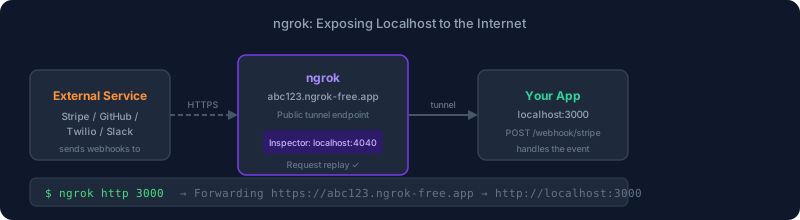
What ngrok Does
ngrok creates a secure tunnel from a public URL to a port on your local machine. When a webhook hits https://abc123.ngrok.io/webhook/stripe, ngrok forwards the request to http://localhost:3000/webhook/stripe.
# Install
brew install ngrok  # macOS
# or download from ngrok.com

# Start a tunnel to port 3000
ngrok http 3000
The output gives you two forwarding URLs — an http and an https version:
Forwarding   https://abc123.ngrok-free.app -> http://localhost:3000
Forwarding   http://abc123.ngrok-free.app  -> http://localhost:3000
That ngrok URL is what you paste into Stripe, GitHub, Twilio, or whatever service sends webhooks.
The Web Inspector
ngrok's killer feature is the local web inspector at http://localhost:4040. Every request that comes through the tunnel shows up with:
- Full headers and body
- Response headers and body from your server
- Latency breakdown
- Replay button
The replay button is what makes ngrok genuinely useful for webhook development. Instead of retriggering a payment, submitting a GitHub PR, or sending a test SMS every time you need to test your handler, you capture the original request and replay it as many times as you need. This is essential for iterating on webhook handling logic.
Common Webhook Development Scenarios
Stripe Webhooks
Stripe's CLI can also forward webhooks, but ngrok gives you more flexibility:
- Start ngrok:
ngrok http 3000 - Copy the https forwarding URL
- In Stripe Dashboard → Webhooks → Add endpoint, paste the ngrok URL + your webhook path
- Trigger a test event from the Stripe Dashboard
- Your handler receives it; use ngrok's inspector to see the full payload and debug your response
For Stripe specifically, remember to verify the webhook signature using the Stripe-Signature header and your endpoint's signing secret. Replaying via ngrok's inspector will use the original signature, so your verification code must allow replays within Stripe's 5-minute tolerance window for local testing.
GitHub Webhooks
- In your repository → Settings → Webhooks → Add webhook
- Paste the ngrok URL +
/webhook(or whatever path you're listening on) - Select events to receive (push, pull_request, etc.)
- GitHub sends a ping event immediately — check ngrok inspector to confirm it arrives
GitHub webhooks send a X-Hub-Signature-256 header for verification. Same replay caveat applies.
Twilio SMS / Voice
Twilio needs a publicly accessible URL for incoming SMS or voice calls. ngrok works perfectly:
- Start ngrok:
ngrok http 3000 - In Twilio Console → Phone Numbers → Your number → Messaging/Voice webhook URL
- Paste the ngrok URL + your handler path
- Send a test SMS to your Twilio number
ngrok Pricing and Plans
ngrok has a free tier that works for most development use cases, with paid tiers for production and team use.
| Plan | Price | Key Features |
|---|---|---|
| Free | $0 | Dynamic URLs, 1 concurrent tunnel, 40 connections/min |
| Personal | $8/mo | Custom domains, 3 tunnels, reserved URLs |
| Pro | $20/mo | Team features, 10 tunnels, custom domains |
| Enterprise | Custom | SSO, audit logs, dedicated support |
The free tier limitation that matters most: dynamic URLs change every time you restart ngrok. You'll need to update webhook endpoints every session. Paid plans give you reserved subdomains (yourname.ngrok.io) or custom domains.
Static Domains on the Free Plan
ngrok does offer one free static domain per account now. Go to ngrok dashboard → Domains → New Domain to claim a permanent subdomain:
ngrok http --domain=yourname.ngrok-free.app 3000
This eliminates the biggest pain point of the free tier — no more updating webhook URLs every session.
ngrok Config File
For projects where you always tunnel to the same port with the same settings, create a config file:
# ~/.config/ngrok/ngrok.yml
version: 3
authtoken: your-auth-token

tunnels:
  myapp:
    proto: http
    addr: 3000
    domain: yourname.ngrok-free.app
Then start with ngrok start myapp or ngrok start --all to start all configured tunnels.
Inspecting Requests with the API
ngrok exposes a local API at http://localhost:4040/api for programmatic access:
# List active tunnels
curl http://localhost:4040/api/tunnels

# Get recent requests
curl http://localhost:4040/api/requests/http

# Replay a specific request
curl -X POST http://localhost:4040/api/requests/http/req_abc123
This is useful for automated testing — you can trigger a webhook in your test setup, wait briefly, then fetch the captured request to assert it arrived correctly.
Alternatives to ngrok
localtunnel
Open source, no account required, no rate limits on tunnels. Less reliable than ngrok (no persistent URLs, occasional downtime), but great for quick testing:
npx localtunnel --port 3000
# Returns: https://warm-dogs-smile.loca.lt
Cloudflare Tunnel
If you're running a server that needs a persistent public URL (not just development), Cloudflare Tunnel is a better fit than ngrok. It's free for personal use, gives you custom domains, and runs as a persistent daemon rather than a development tool. For one-off webhook testing, it's overkill. For a staging server or self-hosted app you want to expose permanently, it's excellent.
Tailscale Funnel
Tailscale Funnel exposes a local service to the public internet through Tailscale's infrastructure. If you're already using Tailscale, this is zero additional setup:
tailscale funnel 3000
The URL format is https://your-machine.your-tailnet.ts.net. Convenient if Tailscale is already in your stack.
webhook.site
webhook.site is not a tunnel — it's an inspector. Go to webhook.site, get a URL, and any HTTP request sent to that URL is displayed in the browser. Useful for inspecting what a service sends without writing any code. Not useful for testing your handler logic.
VS Code Ports Forwarding
If you're in a GitHub Codespace or Dev Container, VS Code's port forwarding tab gives you a public URL for any local port with one click. No installation required. Limited to development container contexts.
Security Considerations
Anyone who discovers your ngrok URL can send requests to your local server. For most webhook development, this is a minor concern — the sessions are short-lived and you're iterating on local code. But be aware:
- ngrok tunnels bypass any firewall or network restrictions protecting your machine
- If you expose a database admin interface (Adminer, pgAdmin) through ngrok, anyone can reach it
- Use ngrok's IP allowlist feature (paid) or basic auth to restrict access in sensitive cases
- Never use ngrok tunnels to expose services in production; it's a development and testing tool
Integrating ngrok into Development Workflow
A typical webhook development workflow:
- Add ngrok startup to your local dev script:
concurrently "npm run dev" "ngrok http 3000" - Use your free static domain so webhook URLs stay consistent across restarts
- In your local
.env, setWEBHOOK_BASE_URL=https://yourname.ngrok-free.appand configure your webhook endpoints programmatically at startup - Use ngrok's replay feature aggressively — it's faster than re-triggering the source
For teams where multiple developers need webhook testing simultaneously, each developer gets their own ngrok account and free static domain. No coordination required.
See also: API Testing Tools Guide and HTTP Clients and API Tools for more on testing HTTP-based integrations.
Subscribe to DevTools Guide Newsletter for weekly developer tooling coverage.