CI/CD Platform Comparison: GitHub Actions vs GitLab CI vs CircleCI
CI/CD Platform Comparison: GitHub Actions vs GitLab CI vs CircleCI
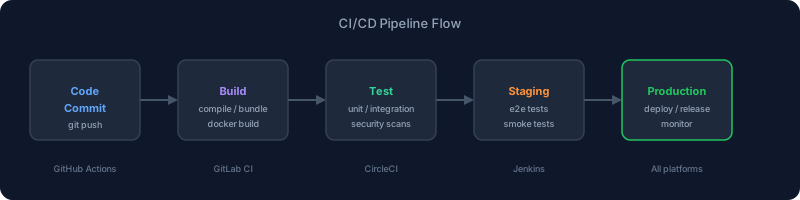
Choosing a CI/CD platform isn't a decision you revisit often, so getting it right matters. The major platforms all do the basics (run tests, build artifacts, deploy code) but diverge significantly on pricing, ecosystem, runner infrastructure, and workflow expressiveness. This guide compares GitHub Actions, GitLab CI, CircleCI, and Jenkins for teams making this decision in 2026.
The Short Version
- GitHub Actions: Best if you're already on GitHub. Massive marketplace, tight integration, generous free tier.
- GitLab CI: Best for self-hosted or compliance-heavy environments. Deeply integrated with the full DevSecOps lifecycle.
- CircleCI: Best for large-scale parallelism and advanced caching. Performance-focused with good Docker support.
- Jenkins: Best if you need complete control and have the ops capacity to run it. High ceiling, high cost of ownership.
GitHub Actions
GitHub Actions launched in 2019 and has grown into the dominant CI/CD platform for open source and most SaaS teams. The integration with GitHub repositories is seamless — push a commit, PR opens, a workflow file in .github/workflows/ handles the rest.
Strengths
Marketplace ecosystem: With thousands of pre-built actions, you can assemble a pipeline quickly. Setting up Node.js, caching npm dependencies, publishing to NPM, and deploying to AWS can each be a single action invocation. The signal-to-noise ratio varies, but the popular actions are well-maintained.
Tight GitHub integration: Status checks, PR comments, deployment environments, secrets management, and OIDC federation with cloud providers all work natively. OIDC in particular eliminates the need to store long-lived cloud credentials — your AWS or GCP access is derived from the job's JWT, not a static key.
Matrix builds: Running the same job across multiple Node.js versions, operating systems, or configurations is straightforward with the matrix strategy.
jobs:
  test:
    runs-on: ubuntu-latest
    strategy:
      matrix:
        node: [18, 20, 22]
    steps:
      - uses: actions/checkout@v4
      - uses: actions/setup-node@v4
        with:
          node-version: ${{ matrix.node }}
      - run: npm test
Free tier: 2,000 minutes/month for private repos, unlimited for public. Most small teams never pay anything.
Weaknesses
Runner performance: GitHub-hosted runners (Ubuntu, Windows, macOS) are adequate but not fast. The hardware is limited compared to CircleCI's resource classes. Large test suites can get slow.
YAML verbosity: Complex workflows become long YAML files fast. Reusing logic requires composite actions or callable workflows, which add indirection.
Cost at scale: GitHub-hosted runners bill per-minute with multipliers for macOS (10x) and Windows (2x). Teams with many CI minutes can face significant bills. Self-hosted runners solve the cost issue but add operational overhead.
GitLab CI
GitLab CI is deeply integrated into GitLab's full platform — merge requests, issue tracking, registry, security scanning, deployment tracking, and Kubernetes integration all live in one place. If your organization is on GitLab, CI is already there.
Strengths
Self-hosted friendly: GitLab can run entirely on-premises, and its CI runners follow suit. For air-gapped environments, compliance requirements, or organizations that want data residency control, this is often the deciding factor.
DevSecOps built-in: SAST, DAST, dependency scanning, container scanning, and license compliance scanning are all first-class features, not bolt-ons. Running a security pipeline is minimal additional YAML.
DAG pipelines: GitLab CI supports directed acyclic graph execution, meaning jobs can start as soon as their specific dependencies finish rather than waiting for an entire stage to complete. For large pipelines, this is a meaningful speed improvement.
GitLab Runners are flexible: Runners can execute jobs using Docker, Kubernetes, shell, or custom executors. The Kubernetes executor in particular makes scaling runners on k8s clusters straightforward.
Weaknesses
Integration outside GitLab: If your codebase is on GitHub but you want GitLab CI, the integration exists but is second-class. GitLab CI is designed for GitLab.
Steeper learning curve: The full platform has significant depth. .gitlab-ci.yml is expressive but can become complex, and advanced features like parent-child pipelines take time to master.
Self-hosted burden: If you're self-hosting GitLab (vs. using GitLab.com), you're responsible for updates, storage, and uptime. That's a real ops commitment.
CircleCI
CircleCI is a cloud-first CI/CD platform that has been performance-focused since its founding. It pioneered per-resource-class pricing and advanced caching strategies that many teams find valuable at scale.
Strengths
Resource classes: CircleCI lets you specify exactly how much CPU and RAM each job gets, from a small 1 vCPU/2GB to large 32 vCPU/64GB instances, and GPU instances for ML workflows. For compute-heavy workloads, right-sizing jobs is a major cost and time saver.
Caching and workspaces: CircleCI's caching system is mature. You can cache dependencies per branch, share artifacts between jobs in a workflow via workspaces, and restore caches with fallback keys. Well-configured caching typically halves build times for dependency-heavy projects.
Parallelism: The parallelism key splits test suites across multiple containers. CircleCI's test splitting can automatically distribute tests using timing data from previous runs, balancing load across parallel executors.
Docker performance: CircleCI handles Docker-in-Docker and Docker layer caching particularly well. Teams building and pushing Docker images frequently benefit from this.
Weaknesses
GitHub/GitLab integration is adequate, not native: CircleCI isn't your code host. It works well with GitHub and GitLab via webhooks, but lacks the seamless status, environment, and PR integration that native CI has.
Free tier limits: CircleCI's free plan allows only one concurrent job. Parallel test execution, the platform's flagship feature, costs money.
Configuration complexity: CircleCI's orbs (reusable config packages) solve repetition but add indirection. The config format is powerful but has a learning curve.
Jenkins
Jenkins is the veteran of CI/CD, open source and infinitely customizable. It has tens of thousands of plugins and runs in any environment you can provision Java on. It's also the most labor-intensive option by a significant margin.
Strengths
Complete control: Jenkins runs on your infrastructure, integrates with anything through its plugin ecosystem, and can be extended to do essentially anything CI-related. No vendor lock-in.
On-premises by design: For organizations that genuinely cannot use cloud CI, Jenkins is often the only viable option.
Weaknesses
Operational overhead: Jenkins requires you to run, maintain, update, and secure the Jenkins controller and its agents. This is a real ops burden. Groovy-based Jenkinsfiles have their own quirks. Plugin compatibility issues surface regularly.
UX is dated: The interface, configuration patterns, and developer experience reflect a decade of accumulated complexity. Modern teams accustomed to GitHub Actions or CircleCI often find Jenkins difficult to work with.
Not recommended for new projects: Unless your organization has existing Jenkins expertise and infrastructure, or a specific compliance reason, modern cloud-native options are faster to set up, easier to maintain, and cheaper when you factor in engineering time.
Side-by-Side Comparison
| GitHub Actions | GitLab CI | CircleCI | Jenkins | |
|---|---|---|---|---|
| Best for | GitHub-native teams | Self-hosted / compliance | High-volume / performance | Full control |
| Configuration | YAML | YAML | YAML | Groovy / YAML |
| Runner infra | Cloud + self-hosted | Cloud + self-hosted | Cloud + self-hosted | Self-hosted |
| Free tier | 2,000 min/mo | 400 min/mo | 1 concurrent job | Free (self-hosted) |
| Parallelism | Matrix builds | DAG + parallel | Parallel jobs + splitting | Plugin-dependent |
| Self-hosted | Supported | First-class | Supported | Required |
| Marketplace | Massive (Actions) | Limited | Orbs | Plugins |
| Docker support | Good | Good | Excellent | Good |
How to Choose
Choose GitHub Actions if: Your code is on GitHub, you don't need custom runner hardware, and you want the fastest time-to-working-pipeline. The ecosystem breadth and GitHub-native integration make it the default for most teams.
Choose GitLab CI if: You're on GitLab, you need self-hosting for compliance, or you want built-in security scanning without stitching together third-party tools.
Choose CircleCI if: Your pipelines are slow due to compute constraints, you have large parallel test suites, or you're doing significant Docker work. The performance focus pays off at scale.
Choose Jenkins if: You have a compliance requirement that mandates on-premises infrastructure and you have the engineering capacity to maintain it. Otherwise, avoid it for new projects.
Migration Considerations
Migrating between CI/CD platforms is annoying but not catastrophic. The workflow configuration needs to be rewritten (no cross-platform compatibility), secrets need to be migrated, and team members need to learn the new syntax. Budget a sprint for a medium-sized codebase. The biggest practical risk is muscle memory — developers who know one platform's patterns well often underestimate what they'll need to relearn on a new one.
Want more on CI/CD? See GitHub Actions Guide for a deep dive into GitHub's platform, and Dagger: Programmable CI Pipelines for a code-first alternative to YAML-based CI.
Subscribe to DevTools Guide Newsletter for weekly developer tooling coverage.