Starship: The Minimal, Blazing-Fast Cross-Shell Prompt
Starship: The Minimal, Blazing-Fast Cross-Shell Prompt
Photo by Eugene Chystiakov on Unsplash
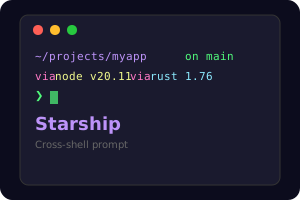
Your shell prompt is the piece of your development environment you look at more than anything else. It tells you where you are, what branch you are on, whether your last command succeeded, and what runtime versions are active. Yet most developers either stick with the shell default or install a framework like Oh My Zsh that adds hundreds of milliseconds of startup latency.
Starship is a different approach. It is a single binary written in Rust that renders a fast, informative, and beautiful prompt for any shell. It works with Bash, Zsh, Fish, PowerShell, Ion, Elvish, Tcsh, Nushell, and Xonsh. Configuration lives in a single TOML file. There are no plugins to manage, no framework to install, and no shell-specific configuration to maintain.
Why Starship?
Cross-shell: If you switch between Bash on a server, Zsh on your laptop, and Fish on a colleague's machine, Starship gives you the same prompt everywhere. Your configuration travels with you.
Fast: Starship renders in under 10 milliseconds on most systems. It runs each module concurrently and only shows information relevant to your current directory. Compare this with Oh My Zsh setups that can add 200-500ms to every prompt render.
Minimal by default: Starship shows you exactly what you need and nothing more. Enter a Git repository and the branch name appears. Enter a Node.js project and the Node version appears. Leave that directory and the information disappears. No clutter.
Customizable: Every module, symbol, color, and format string is configurable through starship.toml. You can build exactly the prompt you want.
Installation
Quick Install (Recommended)
curl -sS https://starship.rs/install.sh | sh
Package Managers
# Homebrew (macOS/Linux)
brew install starship

# Cargo (Rust)
cargo install starship --locked

# Scoop (Windows)
scoop install starship

# pacman (Arch Linux)
pacman -S starship

# apt (Debian/Ubuntu via Nix)
nix-env -i starship
Shell Integration
After installing the binary, add the init script to your shell configuration:
# Bash (~/.bashrc)
eval "$(starship init bash)"

# Zsh (~/.zshrc)
eval "$(starship init zsh)"

# Fish (~/.config/fish/config.fish)
starship init fish | source

# PowerShell ($PROFILE)
Invoke-Expression (&starship init powershell)

# Nushell
mkdir ~/.cache/starship
starship init nu | save -f ~/.cache/starship/init.nu
# Then source it in config.nu
Configuration
Starship is configured through ~/.config/starship.toml. If the file does not exist, Starship uses sensible defaults.
Basic Configuration
# ~/.config/starship.toml

# Set the prompt format
format = """
$directory\
$git_branch\
$git_status\
$nodejs\
$rust\
$python\
$cmd_duration\
$line_break\
$character"""

# Wait 10ms for starship to check files
scan_timeout = 10

# Disable the blank line between prompts
add_newline = false
Directory Module
[directory]
truncation_length = 3
truncate_to_repo = true
style = "bold cyan"
format = "[$path]($style)[$read_only]($read_only_style) "
Git Modules
[git_branch]
symbol = " "
format = "on [$symbol$branch(:$remote_branch)]($style) "
style = "bold purple"

[git_status]
format = '([\[$all_status$ahead_behind\]]($style) )'
style = "bold red"
conflicted = "="
ahead = "⇡${count}"
behind = "⇣${count}"
diverged = "⇕⇡${ahead_count}⇣${behind_count}"
untracked = "?"
stashed = "$"
modified = "!"
staged = "+"
renamed = "»"
deleted = "✘"
Language Version Modules
Starship detects your project's language automatically by looking for marker files (like package.json for Node.js or Cargo.toml for Rust):
[nodejs]
format = "via [$symbol($version )]($style)"
symbol = " "
detect_files = ["package.json", ".node-version"]

[rust]
format = "via [$symbol($version )]($style)"
symbol = " "

[python]
format = "via [$symbol$pyenv_prefix($version )($virtualenv )]($style)"
symbol = " "

[golang]
format = "via [$symbol($version )]($style)"
symbol = " "

[java]
format = "via [$symbol($version )]($style)"
symbol = " "
Command Duration
Show how long commands take when they exceed a threshold:
[cmd_duration]
min_time = 2000  # Show duration for commands over 2 seconds
format = "took [$duration]($style) "
style = "bold yellow"
show_milliseconds = false
Prompt Character
[character]
success_symbol = "[❯](bold green)"
error_symbol = "[❯](bold red)"
vimcmd_symbol = "[❮](bold green)"
Like what you're reading? Subscribe to DevTools Guide — free weekly guides in your inbox.
The Module System
Starship is built around modules -- discrete pieces of information that appear in your prompt based on context. There are over 60 built-in modules. Here are the most useful ones for developers:
| Module | Shows | Trigger |
|---|---|---|
directory |
Current path | Always |
git_branch |
Branch name | Git repository |
git_status |
Changed/staged files | Git repository |
nodejs |
Node.js version | package.json present |
rust |
Rust version | Cargo.toml present |
python |
Python version + venv | .py files or pyproject.toml |
docker_context |
Docker context | Dockerfile present |
kubernetes |
K8s context/namespace | kubeconfig active |
aws |
AWS profile/region | AWS credentials active |
cmd_duration |
Last command time | Command > threshold |
battery |
Battery level | Always (if laptop) |
time |
Current time | Disabled by default |
Disabling Modules
[battery]
disabled = true

[aws]
disabled = true
Custom Modules
Create modules that run arbitrary commands:
[custom.docker_running]
command = "docker ps -q | wc -l | tr -d ' '"
when = "command -v docker"
format = "[$output containers]($style) "
style = "blue"
Presets
Starship ships with several presets you can use as starting points:
# List available presets
starship preset --list

# Apply a preset (overwrites starship.toml)
starship preset nerd-font-symbols -o ~/.config/starship.toml

# Available presets:
# - nerd-font-symbols: Uses Nerd Font icons
# - plain-text-symbols: ASCII only, no special fonts needed
# - no-runtime-versions: Hides language versions
# - bracketed-segments: [segments] in brackets
# - pastel-powerline: Powerline-style with pastel colors
# - tokyo-night: Tokyo Night color scheme
# - gruvbox-rainbow: Gruvbox-inspired with rainbow segments
The plain-text-symbols preset is useful for servers or terminals without special fonts installed. The nerd-font-symbols preset looks best if you have a Nerd Font configured.
Starship vs. Oh My Zsh / Oh My Posh
Starship vs. Oh My Zsh
Oh My Zsh is a Zsh framework, not just a prompt. It provides plugins for autocompletion, aliases, and shell functions. Starship replaces only the prompt part. You can use Starship with Oh My Zsh by disabling Oh My Zsh's theme and adding the Starship init.
Key differences:
- Shell support: Oh My Zsh is Zsh-only. Starship works everywhere.
- Performance: Starship renders in milliseconds. Oh My Zsh themes (especially Powerlevel10k excluded) often add noticeable latency.
- Scope: Oh My Zsh is a shell framework. Starship is just a prompt.
Starship vs. Oh My Posh
Oh My Posh is the closest equivalent to Starship. Both are cross-shell prompt tools.
- Language: Starship is Rust, Oh My Posh is Go. Both are fast.
- Configuration: Starship uses TOML, Oh My Posh uses JSON/YAML/TOML.
- Ecosystem: Oh My Posh has stronger Windows/PowerShell integration. Starship has broader Unix adoption.
- Presets: Both ship with presets. Oh My Posh has more themes out of the box.
Choose Starship if you primarily work on Linux/macOS and want the fastest possible prompt. Choose Oh My Posh if you split time between Windows and Unix.
Practical Tips
- Start with defaults: Starship's defaults are well-chosen. Try it unconfigured first, then customize what bothers you.
- Use
starship explain: Run this to see which modules are active and how long each takes to render. - Use
starship timings: Profile your prompt to find slow modules. If a module takes more than a few milliseconds, consider disabling it. - Keep your config in dotfiles:
~/.config/starship.tomlis a single file, making it trivial to version control and sync across machines. - Use Nerd Fonts: Install a Nerd Font for the best icon support. JetBrainsMono Nerd Font and FiraCode Nerd Font are popular choices.
- Conditional modules: Many modules only render when relevant files are present. This means your prompt stays clean until you enter a project directory.
Starship proves that a shell prompt does not need to be complicated. One binary, one config file, every shell. Once you set it up, you stop thinking about it -- which is exactly what good tooling should do.